

The Earth Shack Software LLC
EarthView
EarthView
Current version: v1.0.1
Discount price of $29.99 during launch period. Expires June 6, 2026
Couldn't load pickup availability
Sales limited to U.S. customers at this time
What is EarthView
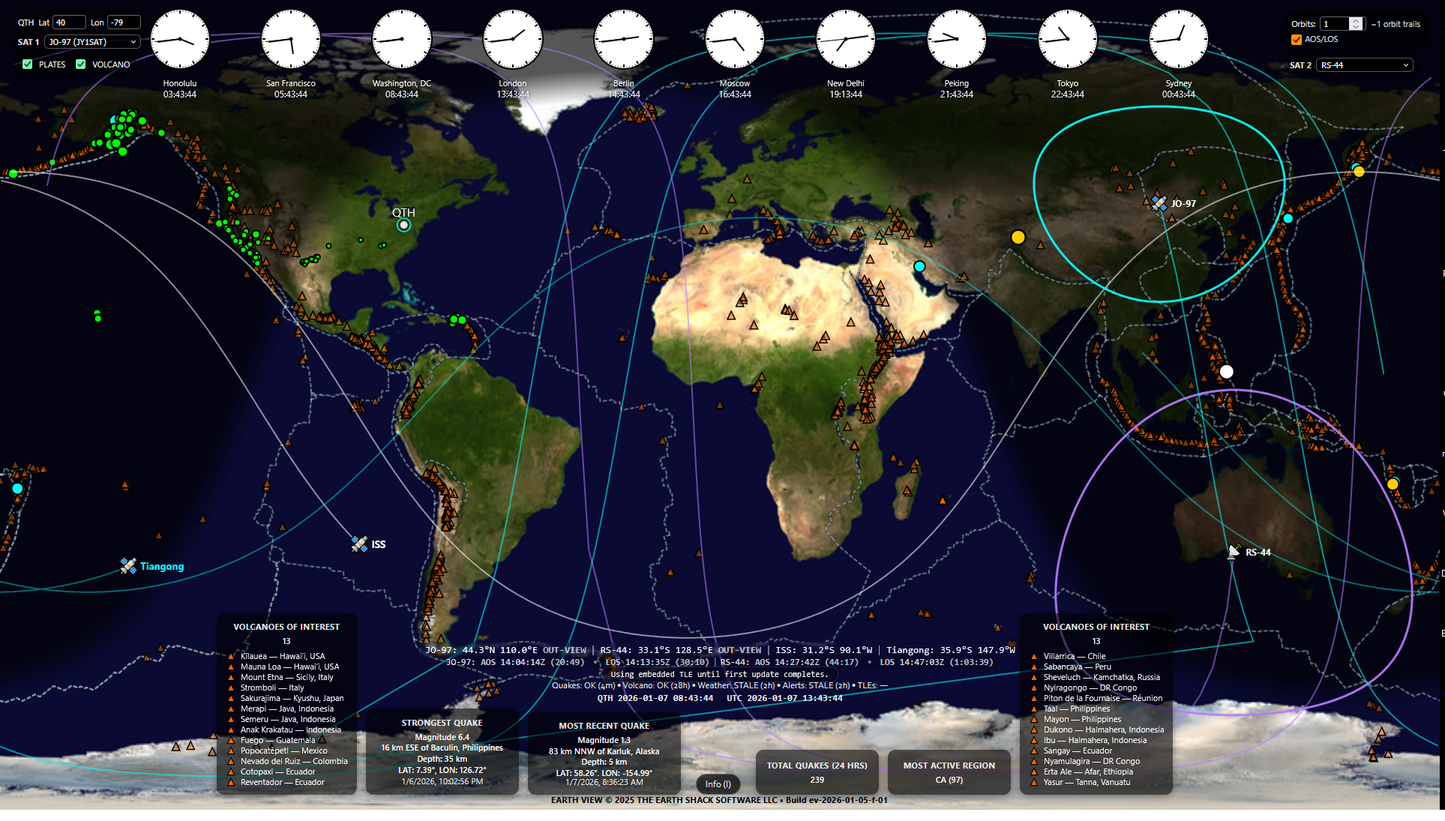
EarthView is a real-time Earth & space situational-awareness display designed for operators, educators, and technical professionals who monitor global activity. It brings multiple authoritative data sources together into a single, clear interface built for large, single-screen, continuous display.
EarthView runs full-screen in a modern browser on Windows, macOS, and Linux, making it easy to deploy on dedicated monitors, TVs, and kiosk-style systems.
EarthView isn’t a toy, a novelty, or a visualization gimmick. It’s a focused tool for people who want trustworthy information at a glance: where things are happening, when they’re happening, and how they’re moving.
Built Around Location, Time, and Motion
EarthView is engineered around a simple idea: awareness happens at the intersection of location, time, and motion. Every feature in the application supports that principle:
- Location: Global map, tectonic plates, and geographic context
- Time: Real‑time city clocks, live data feeds, clear age indicators, and a persistent display of both local station time (QTH) and UTC
- Motion: Dynamic satellites, orbit trails, AOS/LOS, and the live day/night boundary
Space and Orbital Awareness
EarthView tracks key orbiting objects including the International Space Station (ISS) and Tiangong (CSS), plus up to two additional satellites selected from a curated list of ham-friendly satellites.
- Orbits are initially computed from embedded TLEs so you see motion immediately on startup
- When internet connectivity is available, EarthView upgrades to live TLEs from CelesTrak and keeps them refreshed
- A TLE status line clearly shows when orbital data was last updated and whether it’s fresh or stale
- Optional AOS/LOS reporting displays the next acquisition and loss of signal times for selected satellites
- Satellite tooltips show apogee, perigee, latitude/longitude, and visibility status (in view / out of view)
This gives you real-time orbital context without needing a heavyweight tracking suite.
Earth Activity Awareness (Earthquakes)
Monitor global earthquake activity using the USGS 24-hour feed, rendered for fast scanning:
- Magnitude-scaled markers with hover tooltips
- Statistics for strongest quake, most recent event, total event count, and most active region
- A dedicated status line indicating when the quake feed was last updated and whether it’s fresh, stale, or offline
This allows operators to understand global seismic behavior at a glance.
Volcano Awareness (Toggleable)
EarthView includes a curated global volcano overlay sourced from authoritative USGS data:
- Clean, consistent markers for known volcano locations
- Hover tooltips with names and coordinates for quick reference
- Left/right “Volcanoes of Interest” lists for fast situational context
The volcano overlay can be switched on or off at any time and the setting is remembered between sessions.
EarthView does not attempt to provide real-time eruption monitoring — the overlay is intentionally static, designed for clarity and geographic context rather than hazard alerts.
Tectonic Plate Boundaries (Toggleable)
A subtle overlay of major tectonic plate boundaries (PB2002 / fraxen dataset) provides essential geophysical context when interpreting earthquake patterns and regional stress zones.
Like volcanoes, plate boundaries can be enabled or disabled from the interface, letting you reduce visual complexity when needed without losing access to context.
Day/Night Grayline Awareness
EarthView displays the real-time day/night terminator (grayline) across the globe. This gives immediate visual context for:
- Propagation and visibility considerations
- Where local time is likely in daylight or darkness
- How activity patterns may change as the Earth rotates
The grayline updates continuously in real time.
Global City Clocks
A row of real-time global city clocks provides quick reference for major time zones. This supports:
- Coordination across regions
- Scheduling nets, events, or operations
- Situational awareness when monitoring global events
-
Operational Clarity
- High‑contrast interface
- Low‑noise visual design
- Built for continuous use
-
Real‑Time Awareness
- Live environmental overlays
- Real‑time orbital tracking
- Adjustable orbital trails
-
Technical Precision
- Multi‑sensor data fusion
- Fast, stable rendering engine
- Operator‑grade accuracy
- Choosing a selection results in a full page refresh.
- Opens in a new window.